 smartcod
SMART COD PRO · Included in every PRO plan
Hide Cash on Delivery when it does not fit.
Combine checkout conditions to decide when COD is available. Other payment methods remain available.
How it works
Decide when Cash on Delivery belongs at checkout.
A single global switch cannot describe every order. You may accept COD for most of your catalogue, but want online payment for a bulky item, a particular shipping service or a high-value guest order. PRO lets you describe those cases as separate rules, using the same condition editor throughout the plugin.
Every condition inside a rule must match together. For example, “guest customer” plus “cart subtotal at least €150” describes that combination; it does not exclude every guest. Add another rule for an alternative case. Put specific rules before general ones: only the first matching restriction rule is used.
Your checkout, your rules
Combine order, shipping and customer conditions.
Target shipping zones and individual shipping methods, countries, postcodes or cities. Combine them with products, categories, SKUs, cart value, weight, quantity, customer status or role, coupons and supported marketplace or invoice fields. You are not limited to the few examples shown here.
Rules use your own WooCommerce configuration. A zone-and-method condition can distinguish one Flat rate instance from another, even if their labels are similar. This is useful when the cost or terms of COD depend on the actual shipping route.
Explore every available condition →In practice
Example scenarios
Illustrative rules and amounts. You choose the values that fit your store.
| When this happens | Your chosen result |
|---|---|
| Guest customer AND cart subtotal ≥ €150 | Hide COD for this combination; keep it for smaller guest orders. |
| Cyprus shipping zone + “DHL Express” shipping method | Hide COD when the customer chooses DHL Express in the Cyprus zone. Other available payment methods remain selectable. |
| Cart contains a selected bulky-product category | Hide COD for that cart without changing the rest of the catalogue. |
What the customer experiences
When a rule matches, Cash on Delivery is removed from the available payment choices. The customer can continue with the other payment methods available for that checkout. When the customer changes the cart or delivery details, the conditions are evaluated for the updated checkout.
Settings & setup
Set it up in your store
Open WooCommerce → Smart COD PRO and create your hiding rules. Select the conditions, review the rule preview, put the rules in the desired order and save. Test both a matching cart and a non-matching cart. The decision audit helps explain which rule actually applied.
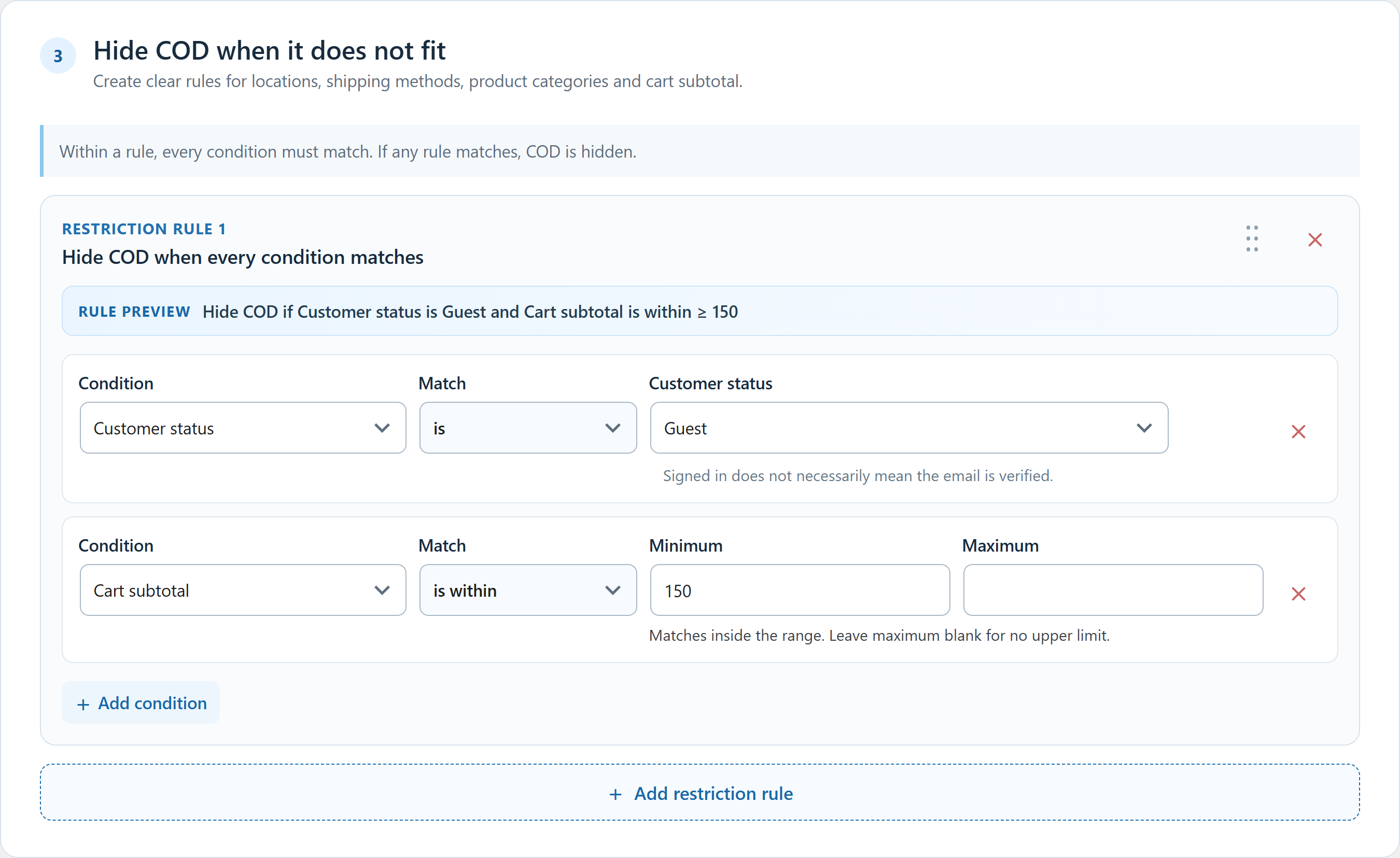 Click to enlarge the actual plugin screen
Questions about this feature
Do I need the network to use these rules?
No. Hiding rules based on checkout conditions work independently of delivery-history protection and ML.
Does a registered customer automatically get restricted?
No. Registration by itself is not a negative history signal. Account status affects a checkout rule only when you explicitly include that condition.